Managing projects
The previous section, Getting started, gave you a quick look at the projects hub. Let's look at it in a bit more detail.
Use Project → Projects… anytime to open the Projects hub (the dialog title is Open project). IceTrackVault can keep many projects on the same music PC—usually one project per competition, each with its own EMS import, project folder, and tracklists. Only one project is open at a time; the menu bar shows Project: … for the active project, and the open row is marked (open) in the list.
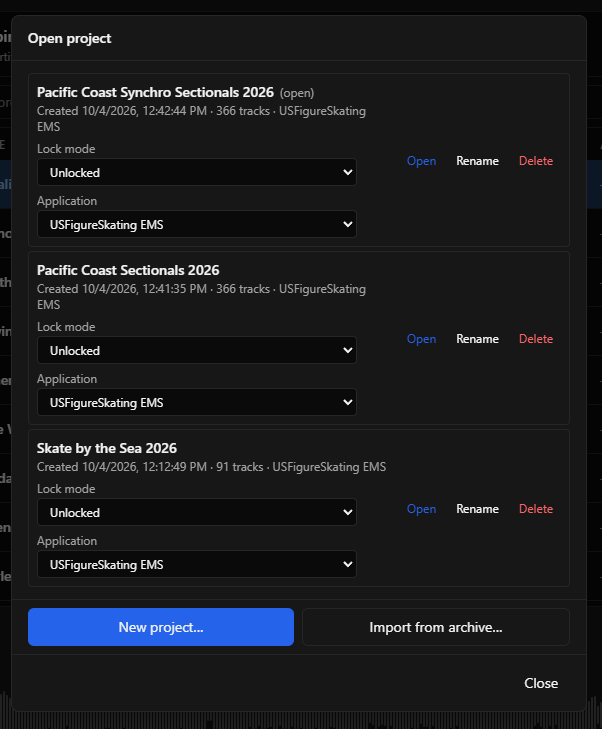
For each project in the list you can:
- Open — load that project and return to the main window.
- Rename or Delete — change the display name or remove the project from IceTrackVault (rename is not available while the project is locked).
- Application — which import workflow the project uses (for example USFigureSkating EMS); change only when the project is Unlocked.
- Lock mode — control accidental edits (see below).
Use New project… to build another competition the same way as in Getting started. Use Import from archive… to open a project from a .iceproject.zip backup you exported earlier (see Best practices — Export project backups).
Lock mode
Each project has its own Lock mode dropdown:
- Unlocked — full editing: tags, events, track order, EMS apply, and similar changes.
- Lock all against changes — protects events, tracklists, and tags during the competition.
- Lock all except playlists against changes — same protection, but you can still edit project playlists.
When a lock is active, the project name shows (locked) or (playlists editable) in the hub and in the menu bar status line.
Leave projects Unlocked while you are still importing EMS data, reordering, or fixing tags. Switch to a lock mode when you are ready to run music. For backup timing, EMS updates, and recovery, see Best practices — Use lock-down modes during the competition.
What to read next
- Using the music player — events, playback, and keyboard shortcuts during the competition.
- Best practices — exports, lock modes, and phone upload timing.